

Learning to code is becoming an increasingly popular option that parents are pursuing to help keep their students’ minds engaged. One device that keeps coming up when talking about coding: the Raspberry Pi.
In this article, I’ll cover some of the most asked questions I get as a youth coding tutor in my work for COPA Coders. You can also reach out to me on Facebook Messenger if you have any specific questions or need further guidance.
Why is it called a ‘Raspberry Pi’?
The creators of the Raspberry Pi were looking for a way to bring back educationally-focused hardware to help students develop a love for computer science. The ‘raspberry’ is a nod to another large, fruit-based tech company that used to dominate the educational space for computer hardware (Apple). The Pi, though sometimes assumed to be in reference to the mathematical constant π (3.141592…), actually references the original intent for the device to only be able to run Python, a simple, popular programming language among beginners and professionals alike.
Why is a Raspberry Pi good for learning to code?
Raspberry Pi products are great for a lot of things, including learning to code. But they’re simple devices that have a very low cost of entry, with a lot of flexibility. They’re not inherently good for coders per se, but rather they’re a great option for students who want to do more than code simple software and write software that interacts with the real world. For example, for students who want to learn how to create websites, there is no real advantage to using a Raspberry Pi over a laptop, save the price. Even then, because these small devices still require a keyboard, mouse, and some type of display to work, you generally have to get more than just the Raspberry Pi itself. There are a lot of great kits out there to get you everything you need, but for some students, they already have access to a desktop or laptop at home that would be more than sufficient to help them learn the basics of coding.

Why is a Raspberry Pi good for learning robotics or other devices?
This is where the Raspberry Pi shines: the so-called “maker” ideas like building a robot, a self-driving toy car, a “smart” mirror, a home automation system, or any other number of things out there. If your student likes building tangible things, pairing coding and “making” with devices like the Raspberry Pi line of computers is a great way to capture their interest.
There are a lot of options for sizes, numbers, and GB. Which Raspberry Pi does my student need?
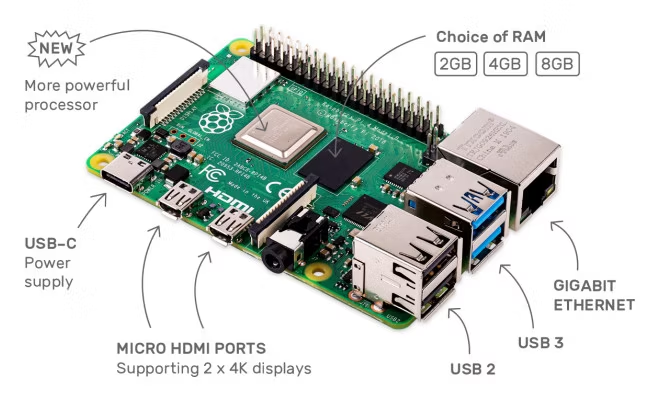
The two newest lines of Raspberry Pi computers are the RPi 4 and RPi 5. These are fairly powerful (similar to mid-range tablets) and general purpose, credit-card sized computers. The RPi 4 has been around for a few years and there are several options, including my personal favorite: the Raspberry Pi 400, featuring a RPi 4 inside of keyboard that’s portable enough for your student to take with them. In the end, the more RAM (the higher numbers in GB you buy), the more things your student will be able to do with it. However, most students don’t use the RPi for anything above 2GB. Additionally, Raspberry Pi devices include smaller options, like the Pi Zero and Pi Zero 2, that are even smaller and use less power. They have even less RAM but are really geared toward simple devices. I use one as a portable ad blocker, for example, when I’m traveling and it runs off of one rechargeable battery. They even make a controller (for advanced makers) that’s even smaller. Two sit in my homemade arcade machine as the interface for my arcade controls and light show.
What software does the Raspberry Pi run?
Raspberry Pi is a hardware platform but, in the interest of promoting their goals, they maintain a version of Linux called Raspberry Pi OS. It’s based on a popular Linux “distribution” called Debian. A lot of software is included with it. I normally recommend students bring a blank Micro SD card or USB flash drive so they can set up their own Raspberry Pi, instead of paying the extra for someone else to do it. They learn more that way and you save a little extra money! Almost all software that runs on the RPi family of products are “open source”, freely available software that is maintained by volunteer professional programmers. Raspberry Pi OS includes a software “store” where your student can find the right kind of software for their needs, from everything from programming editors and media players to electronic circuit design software or 3D/CAD modeling suites.
Where can I buy a Raspberry Pi?
The best advice is: avoid Amazon. Normally that’s a great place to find a good amount of options, but during lockdown and subsequent supplier issues, Amazon became the premier place for unsuspecting parents to get fleeced for otherwise cheap hardware. The official Raspberry Pi website links to some online stores that offer the hardware at- or below-MSRP: https://www.raspberrypi.com/products/